NetBox
NetBox ist eine Open-Source-Software zur Verwaltung von Netzwerkinfrastrukturen. Es bietet eine zentrale Plattform zur Dokumentation, Verfolgung und Planung von Hardware, IP-Adressen, Kabelverbindungen und anderen Ressourcen in komplexen IT-Umgebungen.
apt install -y git

git clone -b release https://github.com/netbox-community/netbox-docker.git /home/admin/netbox

# hostname of netbox is shown on the website, so it should be overwritten
# also the default configuration is using docker volumes, which I don't like, so let's overwrite them
cat <<_EOF > /home/admin/netbox/docker-compose.override.yml
services:
  netbox:
    hostname: netbox.example.com
    ports:
      - "[::1]:8000:8080"

  postgres:
    volumes:
      - "/srv/netbox/postgres:/var/lib/postgresql/data"

  redis:
    volumes:
      - "/srv/netbox/redis:/data"
_EOF

# I also don't like it, that the netbox environment variables contain passwords for
# the database and redis so let's change them (redis) and enable trust auth for postgres
cat <<_EOF > /home/admin/netbox/env/postgres.env
POSTGRES_DB=netbox
POSTGRES_HOST_AUTH_METHOD=trust
POSTGRES_USER=netbox
_EOF

cat <<_EOF > /home/admin/netbox/env/redis.env
REDIS_PASSWORD=$(cat /dev/urandom | tr -dc A-Za-z0-9 | fold -w32 | head -n1)
_EOF

# load the redis password into the environment variables, to be able to print it out in the next step.
source /home/admin/netbox/env/redis.env

# NetBox also put's in a default SECRET_KEY, which is used by django to make sessions.
# If you don't change this an authentication bypass might be possible!!!
# We also set another superuser password, please change it right after the first login.
cat <<_EOF > /home/admin/netbox/env/netbox.env
DB_PASSWORD=irrelevant
REDIS_PASSWORD=${REDIS_PASSWORD}
LOGIN_REQUIRED=true
TIME_ZONE=Europe/Berlin
SECRET_KEY=$(cat /dev/urandom | tr -dc A-Za-z0-9 | fold -w32 | head -n1)
SUPERUSER_PASSWORD=AdminGuide!
_EOF
Nach diesem Schritt kannst du dich einloggen mit admin / AdminGuide!.
    ports:
      - "[::1]:8000:80"
# /etc/nginx/sites-available/netbox.example.com
# https://ssl-config.mozilla.org/#server=nginx&version=1.27.3&config=modern&openssl=3.4.0&ocsp=false&guideline=5.7
server {
    server_name netbox.example.com;
    listen 0.0.0.0:443 ssl;
    listen [::]:443 ssl;
    http2 on;

    ssl_certificate /root/.acme.sh/netbox.example.com_ecc/fullchain.cer;
    ssl_certificate_key /root/.acme.sh/netbox.example.com_ecc/netbox.example.com.key;
    ssl_session_timeout 1d;
    ssl_session_cache shared:MozSSL:10m;  # about 40000 sessions
    ssl_session_tickets off;

    # modern configuration
    ssl_protocols TLSv1.3;
    ssl_prefer_server_ciphers off;

    # HSTS (ngx_http_headers_module is required) (63072000 seconds)
    add_header Strict-Transport-Security "max-age=63072000" always;

    # OCSP stapling
    ssl_stapling on;
    ssl_stapling_verify on;

    location / {
        proxy_pass http://[::1]:8000/;
        proxy_http_version 1.1;
        proxy_set_header Upgrade $http_upgrade;
        proxy_set_header Connection 'upgrade';
        proxy_set_header X-Real-IP $proxy_add_x_forwarded_for;
        proxy_set_header X-Forwarded-For $remote_addr;
        proxy_set_header X-Forwarded-Proto $scheme;
        proxy_set_header Host $host;
        proxy_cache_bypass $http_upgrade;
    }
}
    labels:
      - "traefik.enable=true"
      - "traefik.http.services.srv_netbox.loadbalancer.server.port=80"
      - "traefik.http.routers.r_netbox.rule=Host(`netbox.example.com`)"
      - "traefik.http.routers.r_netbox.entrypoints=websecure"
E-Mail
/home/admin/netbox/env/netbox.env:
EMAIL_FROM=noreply@example.com
EMAIL_PASSWORD=S3cr3T
EMAIL_PORT=587
EMAIL_SERVER=mail.example.com
EMAIL_SSL_CERTFILE=
EMAIL_SSL_KEYFILE=
EMAIL_TIMEOUT=5
EMAIL_USERNAME=noreply@example.com
# EMAIL_USE_SSL and EMAIL_USE_TLS are mutually exclusive, i.e. they can't both be `true`!
EMAIL_USE_SSL=true
EMAIL_USE_TLS=false
OpenID Connect / Keycloak
Ändere User Info Signed Response Algorithm und Request Object Signature Algorithm in dem Keycloak Client (in der
Kategorie: Fine Grain OpenID Connect Configuration) to RS256.
Erstelle nun ein Mapper in dem erstelltem Keycloak client:
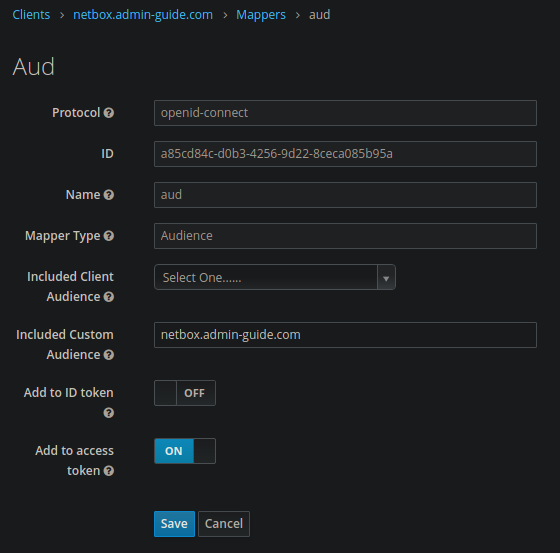
Erweitere /home/admin/netbox/env/netbox.env:
REMOTE_AUTH_BACKEND='social_core.backends.keycloak.KeycloakOAuth2'
Erweitere auch /home/admin/netbox/configuration/configuration.py:
## OIDC Keycloak Configuration
SOCIAL_AUTH_KEYCLOAK_ID_KEY = 'preferred_username'
SOCIAL_AUTH_KEYCLOAK_KEY = '<client id>'
SOCIAL_AUTH_KEYCLOAK_SECRET = '<client secret>'
SOCIAL_AUTH_KEYCLOAK_PUBLIC_KEY = \
  '<public key>'
SOCIAL_AUTH_KEYCLOAK_AUTHORIZATION_URL = \
  'https://id.example.com/realms/main/protocol/openid-connect/auth'
SOCIAL_AUTH_KEYCLOAK_ACCESS_TOKEN_URL = \
  'https://id.example.com/realms/main/protocol/openid-connect/token'
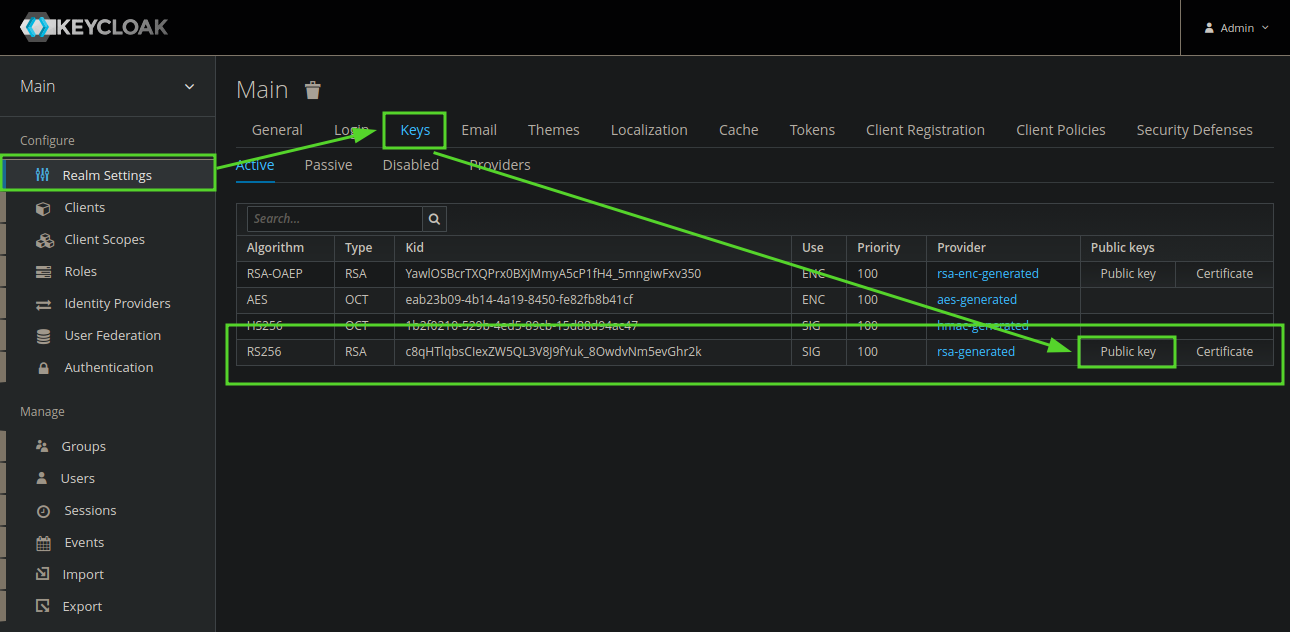
Der Public Key kann in den Keycloak Realm Einstellungen ausgelesen werden:
Netbox Contextmenues
Wir empfehlen dieses GitHub Repo: contextmenu addon.